

Work/Hardware & home

FamilyHub wall board

FamilyHub is a tablet on the wall that holds a family's day. Parents run it from a phone, and the kids use it by touch.

Private buildTabletiOSmacOS

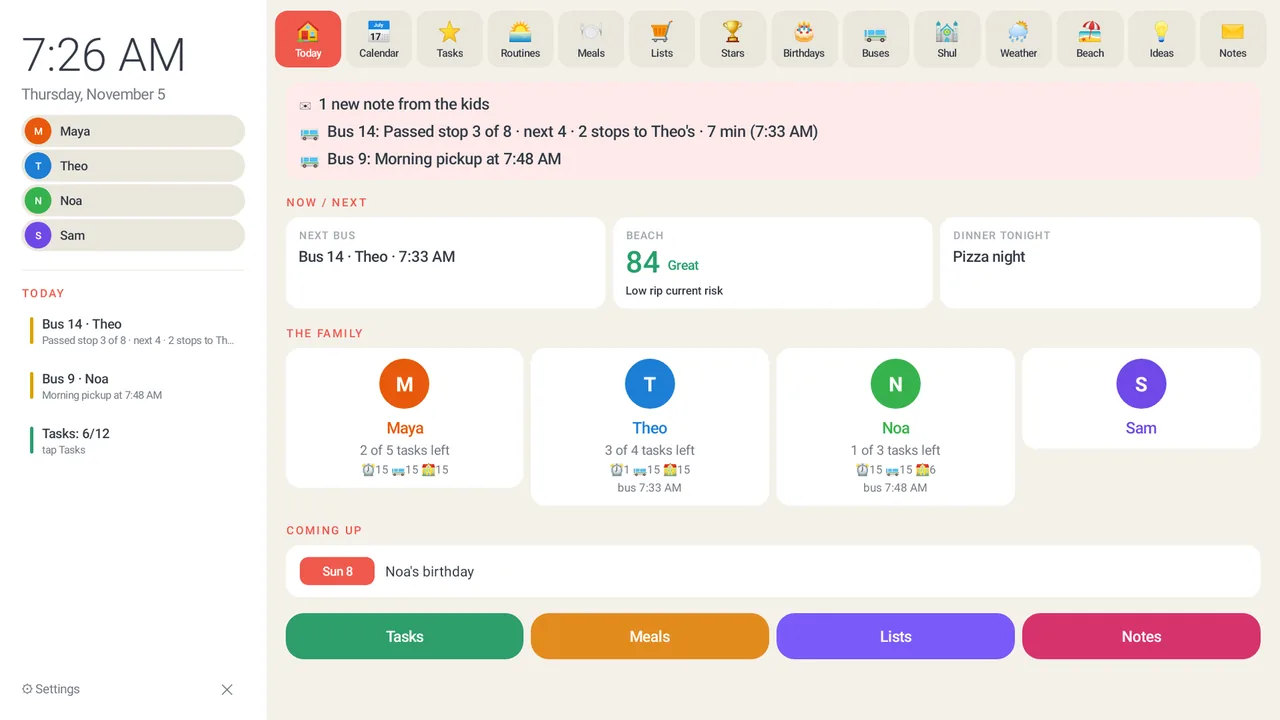
Wall board Today screen with bus status, a beach score of 84, dinner tonight and the family.
  1. 01The Today screen shows both buses, the beach score and tonight's dinner at a glance.
  2. 02The week view puts every child's events and the dinners in one row of days.
  3. 03Meals shows breakfast, lunch and dinner for the whole week. Anyone can add one.
  4. 04Each child has a task list with stars. Tap a name on the left to open a child's own card.
  5. 05Maya's card holds her tasks, meals, stars, requests and notes to her parents.

Sample data

What it does

The board shows what a household argues about. Who is eating what tonight, which chores are done, and how many stars each child has earned toward a prize. Every star has a reason written next to it. Groceries and other lists live there too, and anyone can add to them from the board or from a phone.

It knows the Hebrew date and candle lighting, and the screen goes quiet for Shabbos and Yom Tov. A bus tracker shows where each child's school bus is. A parent can also hand a transcript of the family meeting to an AI assistant, which drafts the week's changes, and nothing lands on the board until a parent has looked each one over.

Hard problem we solved

A wall board that kept losing its screen

The board runs as a kiosk, one app pinned on screen with the browser turned off. Then something would pop over it, and the board would not come back. A wall tablet showing the wrong screen is a wall tablet nobody uses.

The foreground guard was failing for three stacked reasons. The launcher it tried to return to was hard-coded. The service meant to watch the foreground never registered. And Android 10 blocks background activity starts, so even a correct guard could not bring the app forward. Each fix on its own looked like it did nothing, because the other two still held. With all three in place, the board reclaims the screen in about nine seconds. Device-owner mode pins the app, and the stock software stays installed for recovery.

Power cuts get the same treatment. The board keeps its state in local JSON files, and each one is written to a temp file, synced, and renamed under one global lock, so a cut mid-write cannot leave half a file behind. The board also checks daily for a signed update and checks its hash before it installs.

Parents' iPhonesSwiftUI remote appAI agentsMCP or REST, scopedkeysRelay WorkerCloudflare, WebSocketWall tablet appKotlin, embeddedserverLocal JSON filesatomic writesHome Mac helperHomeKit, music, iCloudPublic feedsHebcal, weather, beachSchool bus relaysmall relay server

Where it stands

In daily use on a wall at build 83, with the iPhone remote building clean and headed for TestFlight next.

PatioFan HomeKit bridge

Two remote-control patio fans, now in Apple Home with no hub and no cloud.

Next in Hardware & home